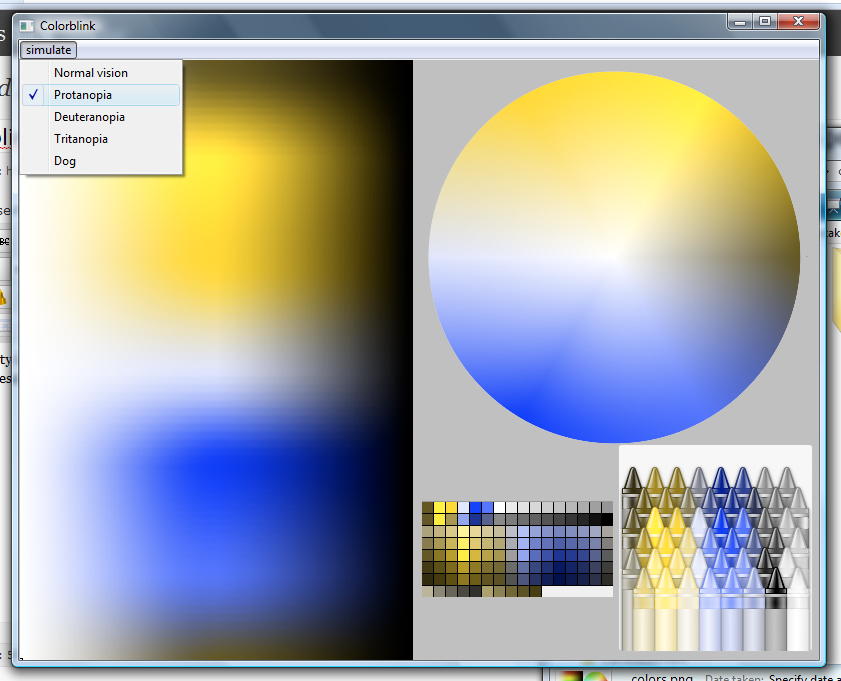
Colorblink – An AIR app that simulates how color blind people see Flash and images

February 19th, 2010  |  Published in Uncategorized

Select color blind type from the menu.

Accessibility is a an important part of both web and game design. And for web and game design, one of the popular tool is Flash. That means very often you need to ensure accessibility in Flash. However there are still not many tools available even for simple things like color blind simulation… so I write my own:)

>> download installer (.air)

It’s a very simple AIR app. You open it, drop a swf file on its window, select the color blind type and that’s it.

The inner of Colorblink is using a Pixel Bender filter, applying to the whole application. The algorithm is just a color transform matrix, found in a Java Color-Blindness Simulators. That simulator have more simulation config, which I used only the simplest one.

This is also my first time using a git repo. So go to have a look, see if you can fork it for more features.

One thing is, there is problem loading Flex applications into Colorblink… I don’t know how to read the loaded app’s default width and height and then resize it… So, if you want to test your Flex app, get the filter and apply it to your app manually (can’t be easier).
Now you can load Flex swf or even html file! But the app wouldn’t resize automatically since the size cannot be determined. If Colorblink does not work for you, you can still always get the filter and apply it to your app manually (can’t be easier).

Oh, yes, there is a simulation of what a dog sees… So, design some game for your dogs in your free time…

Tags: , , ,

Bicubic resampling by Pixel Bender

August 25th, 2009  |  Published in Uncategorized

There is bilinear resampling by Pixel Bender already, why not bicubic too?

With the very helpful Java implementation, I can get bicubic resampling running in Pixel Bender in hours.

Here is my result, along with the resampling results in PhotoShop as a comparison:

Source image (4x4), scaled by your browser)

Source image (size 4x4, scaled by your browser)

Source image enlarged in PS (nearest neighbor)

Source image enlarged by PS (nearest neighbor)

Bicubic resampling by Pixel Bender

Bicubic resampling by Pixel Bender

There is some difference with PhotoShop’s versions (below), hope it’s not my mistake…

Bicubic resampling by PhotoShop.

Bicubic resampling by PhotoShop.

Bicubic smoother in PhotoShop

Bicubic smoother by PhotoShop

Bicubic sharper in PhotoShop

Bicubic sharper by PhotoShop

My codes can be downloaded below:
Bicubic resampling sample program source (with PB source)


Update:
Notified by author of the Java version, the Java code was wrong and has been updated. Here below is my updated code:
Bicubic resampling sample program source (with PB source)

updated output of PB


Update (2010-11-17):
Once again notified by Paul, the author of the Java version, there is something need to be updated. Here below is my updated code:
Bicubic resampling sample program source (with PB source)

updated output of PB

Tags: , ,

Playing with chroma key and thresholding in Flash (with Pixel Bender)

August 18th, 2009  |  Published in Uncategorized

While traveling with my gf in Europe, I’m planning to develop a better technique to use color marker in FLARtoolkit (which I’ve tried before).

YouTube Preview Image

For the first step of doing so is to find a algorithm of matching colors. Using blend mode “difference” on the image is not flexible and may not fit all situations. I decided to calculate the difference by comparing hue, saturation and brightness of the colors and then threshold the image.

This is very similar to (if not exactly) doing chroma key. Maybe there is some awesome beautiful chroma key algorithm but I can’t find a fast and flexible enough to do so. If you know one, please tell me. :)

One problem I faced is choosing between color space models. RGB surely wouldn’t be the choice since it do not give hue value directly. There are HSV and HSL I found to be quite suitable. The two models share the same algorithm to calculate hue but have different ones for saturation and brightness. After reading the algorithms, my decision is… try both. :P

Another problem is how to preform thresholding. First method is after calculating the pixel difference, add the difference in hue, saturation and brightness altogether with weightings and do a one-time threshold to the gray-scale image. Second method is calculate the difference and give threshold limits to the three channels (H,S,V or H,S,L), only the pixels pass all the three thresholds will be white. First method should be more easily to incorporate with other filters developed for AR (like the very hot adaptive thresholding), but the second method can be more precise.  Finally I tried both too…

Here is the result. While I have set some default values to the filters, be sure to play around with the values when you change the target color. There wouldn’t be a set of values that fits all methods and situations. :)

I’ll try integrate it with FLARtoolkit and release the source when it is ready, be sure to check back soon. :)

Update:
Source and new demo is here!

Tags: , , ,